
|
CONFIGURATION |
||
|
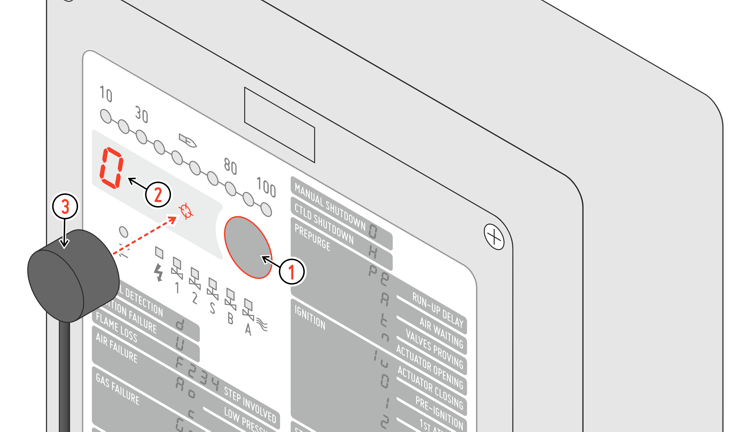
To change the device configuration: 1 Press the front button to force the MANUAL SHUTDOWN 1 condition 2 Display code 0 confirms that current status is MANUAL SHUTDOWN 3 Put the optical jack on the crosshairs between the display and the key the internal magnet will hold it in place Connect the optical jack Q.link to a USB port on PC, notebook or Android device and start Q.Suite software or App.
All parameters can be read, but modification is password protected (factory default 00000000). 1 In monitor mode Q2 must be in OFF condition (display 0). |
||
|
|

|
It is highly recommended to save and retain the configuration of every device to a dedicated file. This practice is essential to:
Why is it important to maintain a copy of the configurations? The system features 122 individually configurable functional parameters (excluding the 5 communication-related parameters). This vast range of choices results in an astronomical number of possible configurations: 4,001×10161. . |